Prism by Amani Digital
An AI that actually knows you.
Most AI starts every conversation from zero. Prism captures the whole picture of who you are — across the parts of your life that matter — and keeps it on your device, yours to take into any AI you use.
Desktop app for macOS and Windows, and on iPhone and Android. 7-day free trial.


Available in the United States. See our Terms of Service.
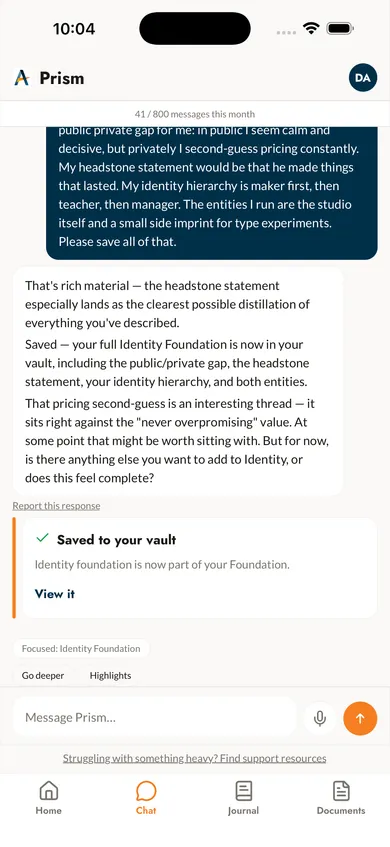
An AI that knows you
Stop re-explaining yourself. Prism gives every AI the whole picture of who you are, so generic advice becomes advice from someone who actually knows you.
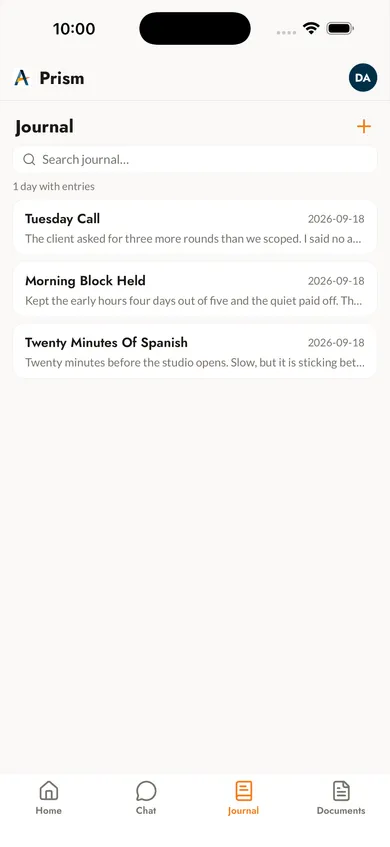
Responsive journaling
A living check-in, not a static profile. Capture what happened, what you’re weighing, what you’re carrying — and pick up the thread next time.
You own your data
Your vault lives on your device. On a computer it’s plain files you can open, move, or delete; on your phone it’s encrypted. Never used to train AI.
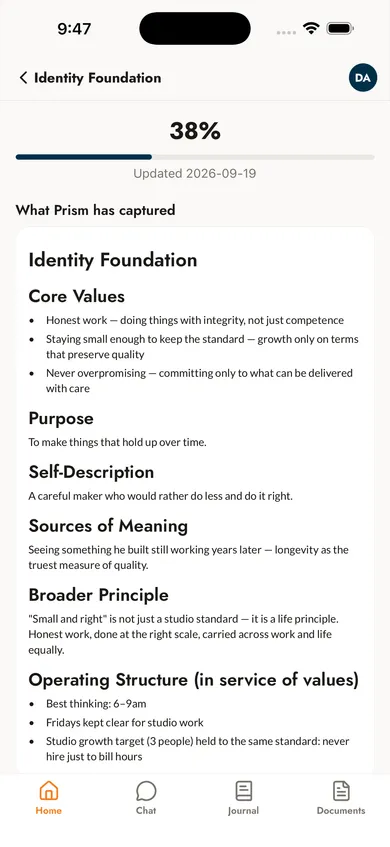
Self-discovery that compounds
Understand yourself better over time. Your Blueprint — a portable context file you can take to any AI — keeps up as your life evolves.
On your phone
How it works
What you’ll actually do
Prism is a series of conversations — not a test. Prism asks; you answer at whatever depth feels true. Sessions save automatically, so you can come back tomorrow or in a month.
10 Life Dimensions
Identity, relationships, finances, health, purpose, decision-making, and more.
Private & Local
On a computer, your vault is a folder protected by your computer account, and you can run the AI on-device too. On your phone, it’s encrypted. Never used to train AI.
Your Pace
Pause anytime, pick up where you left off. One session or many.
What it produces
Your Life Gap Map
Ten dimensions, rated on where you are now and where you want to be. The space between is the work that matters.
On your phone
iPhone and Android. Journal, check in and talk things through wherever you are. Your vault is encrypted on the phone, with its keys held in the iOS Keychain or Android Keystore.
On your computer
Mac and Windows. Work through all ten dimensions at your own pace and take your Blueprint into any AI. Your vault is a folder of plain Markdown files, protected by your computer account — turn on FileVault or BitLocker to encrypt the disk.
One account and one subscription on every device. What you send in chat reaches our servers to generate a reply; Prism never trains AI on your answers.
Start free
7 days, full access
All 10 dimensions. Add a card to start; cancel before day 7 and you won’t be charged.
Inside Prism
10 dimensions of your life
From identity and relationships to finances and rhythm — one conversation per area. Drag, swipe, or use the arrows to explore.

Dimension 01
Identity & Foundation
Core values, wiring, and the beliefs that shape your decisions.

Dimension 02
Narrative Identity
The stories you tell yourself and how they drive behavior.

Dimension 03
Relational Architecture
Relationship patterns, attachment style, and social dynamics.

Dimension 04
Wellbeing & Vitality
Physical health, energy management, and sustainable habits.

Dimension 05
Financial Position
Money mindset, financial health, and resource allocation.

Dimension 06
Growth & Purpose
Career trajectory, learning patterns, and sense of meaning.

Dimension 07
Life Gap Map
Where you are vs. where you want to be across life areas.

Dimension 08
Owner Operating Profile
How you operate under pressure, delegate, and lead.

Dimension 09
Decision Architecture
Your decision-making frameworks, biases, and risk tolerance.

Dimension 10
Operational Rhythm
Daily routines, time management, and productivity patterns.
Get set up
Download Prism, sign in, and begin
Prism Desktop — native app setup
Setup for the native app
Native macOS and Windows builds. Your vault lives in a folder on your machine. AI runs through your Amani Digital subscription — no Claude key, no Claude Pro.
Create your Prism account
You’ll need a Prism account to track your Foundation. Sign up is free and takes about a minute. (You add a card when you start your 7-day free trial — not charged until it ends, cancel anytime.)
Install Prism
On Windows, run the installer. On macOS, open the disk image and drag Prism into Applications.
macOS
The download is Prism.dmg. Double-click it to open the disk image, then drag Prism onto the Applicationsfolder — the window shows an arrow pointing the way. Open Prism from Applications when it’s done.
Windows
Run the downloaded installer and follow the prompts. Prism lands in your Start menu when it’s done.
Sign in to Amani Digital
Click the sign-in button. Prism opens your browser, you sign in at amanidigital.com, and the browser hands you back to the app. Your password never enters Prism. After this, the app uses your subscription’s AI quota directly — no Claude API key, no Claude Pro.
Choose where your vault lives
If you already have a Prism vault from the Claude Desktop extension, Prism finds it and offers to keep using it. Otherwise it defaults to your OS’s app-data folder — ~/Library/Application Support/Prism/vault on Mac, %APPDATA%\Prism\vault on Windows. Edit the path on the screen if you want it somewhere else.
Start your first assessment
The final onboarding screen has a Start your first assessmentbutton. Click it and the AI opens a guided conversation, walking you through the dimensions. Sessions save automatically — come back tomorrow or in a month and pick up where you left off.
FAQ
Questions
Is it really free to start?
Yes — a 7-day free trial with full access to all 10 dimensions. You add a card to start the trial (so it can roll into a plan if you continue), but you’re not charged during the trial. Cancel anytime before it ends and you pay nothing. The iPhone and Android apps are free to download, and chat on them uses the same trial.
Where is my data stored?
On iPhone and Android, your vault is stored encrypted on the phone, with its keys held in the iOS Keychain or Android Keystore. On a computer, yourvault is a folder of readable Markdown files on your computer — by default ~/Library/Application Support/Prism/vault on Mac, %APPDATA%\Prism\vault on Windows, and you can put it anywhere you like. Those files are protected by your computer account, the same as the rest of your documents, and full-disk encryption — FileVault on Mac, BitLocker on Windows — covers them the way it covers everything else, so it is worth switching on. The original files you import are stored encrypted in the vault. The AI runs through your Amani Digital subscription, so the app contacts our servers to answer you: your message, the conversation so far, and any context you attach are sent to us to generate a reply. The vault itself is not uploaded. Your chat history is kept separately in Prism’s application-data folder rather than in the vault, and Prism clears it 90 days after you last used a conversation, or as soon as you delete one. Nothing you send is used to train AI models.
Which devices does Prism run on?
iPhone with iOS 17 or later, Android phones running Android 8.0 or later, Macs running macOS 11 or later, and PCs running Windows 10 or later. One account and one subscription covers all of them. Prism is offered in the United States only.
Can I use my Blueprint with other AI?
Yes. Your Blueprint is a portable context file. Paste it into Claude, ChatGPT, Gemini, or any AI you use, and watch generic advice become advice from something that knows you. The file is yours — locked to no one.
How do I install Prism on macOS?
The download is a disk image (Prism.dmg). Double-click it to open, then drag Prism onto the Applications folder — the window shows an arrow pointing the way. Open Prism from Applications when it’s done.
Having trouble?
Prism Desktop ships with a built-in Help & Diagnostics screen that checks your setup and connectivity. If you’re still stuck, email support@amanidigital.com.